
Call (888) 569-9909 during business hours for additional support.
Home » Rewards program

Log in to online banking at www.bankfivenine.com.

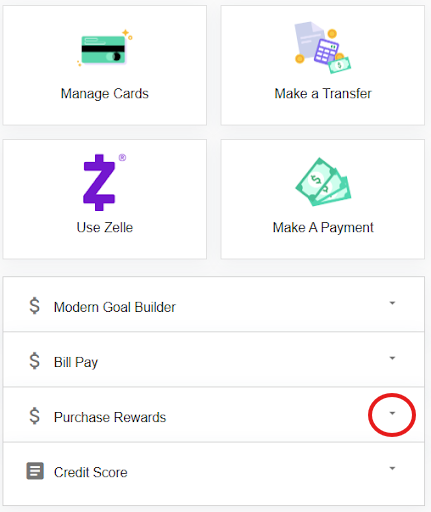
Expand the Purchase Rewards section on the right side of your screen

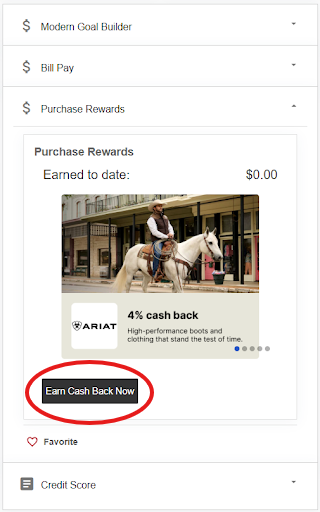
Click on the Earn Cash Back Now button.

Click to add offers and shop now at your favorite retailers.
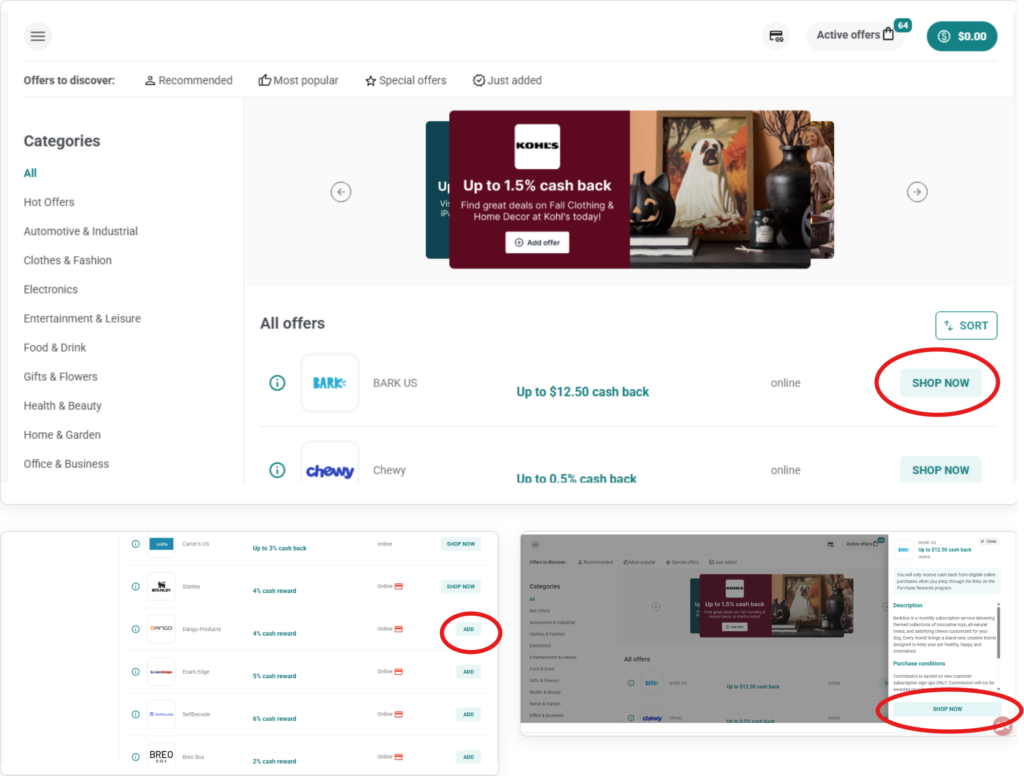

Track offers at the top of your screen, sort by category, mark favorites, or just look around.

Sit back, relax and watch the rewards roll in.
This rewards program lets you earn rewards by using your Financial Institution’s debit card to purchase merchandise and services. The program is available to all debit Cardholders ("Cardholders"). As a Cardholder, there is no limit to the rewards you can earn so the more you use your Financial Institution’s debit card, the more rewards you can earn!
Once you have joined, you will be able to start using the offers and earning cash back. Some offers will need to be activated, and some are already available to use. Refer to the instructions on the offer to see how the offer can be redeemed.
After making a qualifying purchase, the offer will automatically be applied, and you will receive cash back in your checking account between 30-45 days for Card Linked offers, 120-150 days after the offer is redeemed for ‘Click to Purchase’ offers, and for Hotel offers, 45 days after you have completed your stay.
Click on the JOIN NOW button in the Purchase Rewards banner or the JOIN NOW button on the offers.
Clicking on either JOIN NOW button will register you for the Purchase Rewards program.
You have now registered and can start earning cash back.
Yes, this program is free! There is no cost associated with this program, making it easy for Cardholders to earn rewards. This new rewards program is just another benefit of using your Financial Institution’s debit card.
You can earn cash back by making a qualifying transaction (a transaction that meets the Purchase conditions of the offer and purchase method) on one of the offers.
A transaction that meets the Purchase conditions of the offer and purchase method.
You must use your Financial Institution’s debit card that is associated with your primary checking account to earn rewards. This program is not applicable for your credit card.
Choose an offer and click on the ADD button. Once you have activated an offer, you are able to take advantage by shopping and paying with the registered card on your checking account. Nothing else is required. You will automatically receive the cash back. Activated offers will continue to appear on the homepage and will also appear in the Active offers page.
There are several options to search for offers.
If you are looking for an offer from a specific merchant, sort by merchant/offer categories, e.g. Leisure & Entertainment. Some merchants may have offers displayed in multiple categories.
You can sort offers by Newest, Expiring soonest and Alphabetically (both ways).
You can search for a merchant – just type in the merchant's name in the search field.
You can find offers by selecting the tabs at the top of the page.
You can also use a combination of sort, search and category.
When viewing an offer, click on the information icon next to the merchant to see the detailed Purchase conditions.
Specific details for each offer will be included in the Purchase conditions associated with the offer. Please check there to learn more.
Specific details for each offer will be included in the Purchase conditions associated with the offer. Please check there to learn more.
The expiration date is the last day you can shop and make a qualifying purchase in order to earn the reward for that offer.
A 'minimum spend' for an offer is the minimum amount you must spend in order to qualify for the offer. If an offer has no minimum spend, it means that you will receive the offer on any purchase amount from the associated retailer.
This is a Card Linked Offer and means once you have linked the offer you can shop and earn cash back with this merchant and offer via the merchants site and, if applicable, instore.
Typically, you do not need a coupon or code to redeem an offer. Each offer has different specifications regarding when and where you shop and how much you need to spend. Offers that require an online purchase are indicated and may include a redemption code. Please read offer Purchase conditions to determine how to redeem each offer.
No, but you don’t need to use it. It will be removed automatically once it has expired, or the terms of the qualifying purchase have been met.
The Transactions page indicates the status of each redeemed offer.
The only thing you need to do at checkout is use the debit card associated with the account enrolled in Purchase Rewards to pay for the goods or services associated with the offer. If the purchase meets the requirements of the offer, it will be automatically applied.
Your offers will be activated for the debit card on your primary checking account. You can see which account the offer is linked to, by clicking on the card icon at the top of the page and in the navigation panel.
As long as you have used the debit card on your enrolled primary checking account when you have made the purchase, the cash back will go into this account. You can see which account the offer is linked to, by clicking on the card icon at the top of the page and in the navigation panel.
A qualified purchase will show up in the Transactions page with the expected cash back.
This status means that we are checking that your transaction has met the offer conditions and, if it qualifies, we will process the cash back request.
This status means that we have completed the cash back process and you should have received the cash back in your enrolled primary checking account.
Unfortunately, something went wrong during the processing of the cash back on the transaction. Please contact Support with the details of the offer including the transaction date and the amount of purchase. You may also be asked to supply the transaction receipt.
This could be for several reasons. The most common are:
You cancelled your hotel booking.
You have returned the products you purchased to the retailer.
Your payment failed or you didn’t meet the requirements of the retailer’s credit check.
Your last click with some retailers didn’t originate from the Purchase Rewards site.
Your transaction didn’t meet the retailer’s Purchase conditions.
In these instances, you won’t receive cash back for your transaction.
Your rewards will typically be deposited to your checking account between 30-45 days after you made a qualifying purchase for a Card Linked offer, 120-150 days after you made a qualifying purchase for a ‘Click to Purchase’ offer, and for Hotel offers, 45 days after you have completed your hotel stay.
Although every best endeavour is made to deposit the cash back within these timeframes there may be some instances when this time is longer.
Once the cash back has been deposited into your checking account, your transaction status will be updated to ‘Completed’ on the Transactions page.
If you believe you have fulfilled the Purchase conditions and the purchase method, have used your primary checking account debit card to make the purchase, and it has been more than 30-45 days since a qualifying purchase for a Card Linked offer, 120-150 days since a qualifying purchase for a ‘Click to Purchase’ offer or 45 days after you have completed your hotel stay, please contact Support with the details of the offer including the transaction date and the amount of purchase. You may also be asked to supply the transaction receipt and, in the case of hotel bookings, the itinerary ID.
No. Your personal information is not shared with merchants. In fact, no personal information leaves your Financial Institution.
To find out more, please read our Privacy Policy.
To find out more, please read our Privacy Policy.
To find out more, please read our Privacy Policy or should you have any further questions, please contact us.
You can opt out by clicking on the Opt-out page and clicking the Remove me button.
Once you opt out, you will have up to 30 days to view your current Purchase Rewards program account and rejoin. If you do not rejoin within 30 days, your earned rewards amount will be reset to zero.
No, unfortunately not. If you choose to leave Purchase Rewards program, you will no longer earn cash back from offers when you shop. Any offers that you redeemed before you left will appear in the Transactions page.
If it was a qualifying purchase, then the cash back should appear on the Transactions page. However, you won’t be able to redeem any offers after you have opted out.
Yes, you will still have access to the Transactions page for 30 days and be able to see all your past and processing transactions.
Yes, you will have up to 30 days to view your current Purchase Rewards program account and rejoin.
If you wait after 30 days, you will need to rejoin the program and your rewards earned total will show as zero.
This program is administered through a third-party. All personal identifiable information is secure and is not shared with the third-party. Our third-party will make best efforts to collect all of the rewards due to you. The Financial Institution is not liable for cash back rewards, but will work with the partner to ensure a great customer experience.
Please contact us at (888) 569-9909 if you have any questions.
If you believe you have not received your reward for a transaction you have made up to 60 days ago on a Card Linked Offer, 165 days for a ‘Click to Purchase offer’ and 50 days since your hotel stay has been made, to raise a query.
If you close your primary checking account, you run the risk of not receiving any rewards that may be due back to you.
Yes, if the offer Terms & Conditions allow this. Do keep in mind the requirements of the activated offer still must be met, and the cash back will be calculated on the final transaction amount.
We can help with that! Contact us at (888) 569-9909 with the name of the merchant and we’ll contact them to discuss.
This is because we have added some exciting new cash back offers that have a longer time to process the cash back.
You will receive your cash back 45 days after your completed stay. This cash back will be in the form of a statement credit to the card you used to pay for your stay. On your statement, the credit will be from Hotel Accommodations.
Please try the following:
Check your spam or junk folder and any tabs in your inbox to see if your confirmation email was inadvertently sent to one of those folders.
Log into your Rewards Account, go to your Transactions page and click on the itinerary ID for the respective hotel booking.
You'll see your hotel booking information including your cash back and cash back date information.
You'll also have the ability to resend your hotel booking confirmation email to the email address you provided at purchase or to a totally different email.
If you can’t find your email, please call our Hotel Booking Support at (800) 254-7780.
Note: When booking your hotel room, always verify your email address you entered during the purchase process. This is the email address we will send your confirmation email to.
Please call Hotel Booking Support at (800) 254-7780 This number can also be found in the confirmation email you received when you booked your hotel.
Note: When booking your hotel room, always verify your email address you entered during the purchase process. This is the email address we will send your confirmation email to.
Please call Hotel Booking Support at (800) 254-7780. This number can also be found in the confirmation email you received when you booked your hotel.
In addition, you can see the hotel provider’s cancellation policy, in this same email, regarding refunds of a reservation and/or any cancellation fees that may apply. The policies are clearly detailed and are closely followed because of our contractual arrangements
Due to industry regulations, we can only send refunds back to the original payment method.
The cash back will also register in your Purchase Rewards account only if your card was linked to your Purchase Rewards account at the time of purchase. On your debit statement, the credit will be from Hotel Accommodations.
Please contact us at (888) 569-9909 with the details of the offer including the transaction date and the amount of purchase.
This could be for several reasons. The most common are:
You cancelled your hotel booking.
You have returned the products you purchased to the retailer.
Your payment failed or you didn’t meet the requirements of the retailer’s credit check.
Your last click with some retailers didn’t originate from the Purchase Rewards program site.
Your transaction didn’t meet the retailer’s Purchase conditions.
This could be for several reasons. The most common are:
You have returned some or all the products you purchased to the retailer.
Your transaction didn’t meet the retailer’s Purchase conditions.
On some offers, cash back is not earnt on the shipping, handling, tax, or the purchase and/or use of gift vouchers, which for avoidance of doubt, includes gift cards, gift certificates, and other similar cash equivalents.
This will depend on the offer so make sure you check the Purchase conditions for each offer to see if it is excluded. For some offers, cash back will not be earnt on shipping, handling, tax, or the purchase and/or use of gift vouchers, which for avoidance of doubt, includes gift cards, gift certificates, and other similar cash equivalents.
For these offers, we are not able to allocate cash back for the purchase. The next time you shop, be sure to access the retailer’s website via the Purchase Rewards program site, if stated by the offer, so we can track your visit and award your cash back.
This is because of the type of offer and how we track and award cash back.
Here are some best practice guidelines to help make sure you receive your cash back from these types of offers:
Complete your purchase online, all in one session.
If you decide after checking out that you want to purchase something else, close the retailer site window and start the process again, starting from the Purchase Rewards program site.
Don't retrieve previously saved items in your shopping cart; start completely from scratch.
Don’t click on another banner or website promoting the retailer before you complete your transaction. If you must visit another site before completing your purchase, please use a different browser to do so. Interrupting the browser session that started from the Purchase Rewards program site can affect tracking.
Don't use "refer a friend" programs, again this changes the referrer.
Telephoning the retailer to complete or modify your order will likely override the Purchase Rewards program tracking and therefore your cash back.
Increasingly some ad blocking software programs prevent the special tracking codes we need to track your purchases, please disable your program before using the Purchase Rewards program
Don’t switch to another country’s link within the merchant’s site for making a purchase as most merchants would not track the purchase if the country’s domain has changed.
Please try using Purchase Rewards and shopping via your desktop.
These are offers that we think you will most likely be interested in.
These are offers that are most popular across the Purchase Rewards program.
These are offers specific, and available to you in your local area.
These are offers that for a set period, may have a special cash back rate. Special offers have a white star in a red corner tab.
These are offers that have been added in the last 30 days.
These are offers that are due to expire in the next 30 days.
Unfortunately, Health Savings Accounts (HSAs) are not eligible for the Purchase Rewards cashback and loyalty program and do not qualify for rewards due to federal and state laws and regulations.